LumaKit – Flashlight & SOS
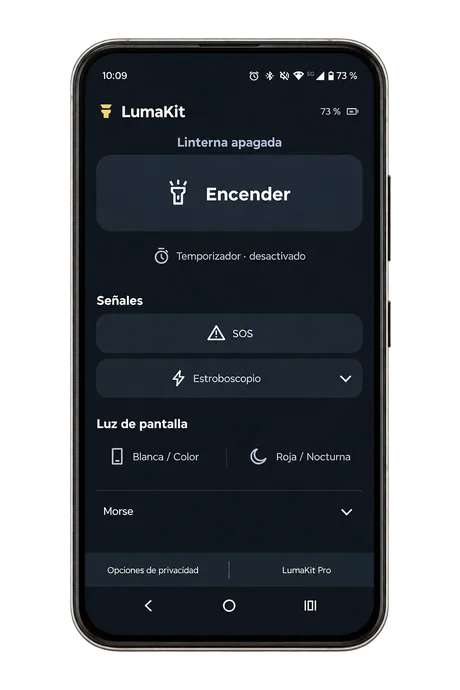
Flashlight, SOS signals, strobe light, Morse code, and screen lighting. Practical tools combined in one easy-to-use app.
One app, many useful tools
Lighting, signaling, and quick access features in a simple, intuitive interface.
Flashlight
Turn on your phone’s flashlight instantly and adjust its brightness on compatible devices.
SOS signal
Activate an automatic SOS signal using your phone’s camera flash.
Strobe light
Adjust the flash frequency to suit your needs.
Morse code
Send messages using light, sound, or both at the same time.
Screen lighting
Use white light, customizable colors, or red night lighting with adjustable brightness.
Timer and quick access
Set an automatic shutdown timer and control the flashlight using widgets or Android Quick Settings.
Everything you need to know about LumaKit
Find answers to the most common questions about our flashlight app.
What features does LumaKit include?
LumaKit combines a flashlight, SOS signals, a strobe light, Morse code, screen lighting, a shutdown timer, and quick access controls in a single Android app.
Can I use LumaKit to send an SOS signal?
Yes. You can activate an automatic SOS sequence using your phone’s camera flash.
Can LumaKit send messages in Morse code?
Yes. You can enter a message and transmit it using flashes of light, sound, or both simultaneously.
Can I adjust the strobe light frequency?
Yes. LumaKit allows you to adjust the flash frequency to suit your needs.
Can I use my phone screen as a light source?
Yes. You can use white light, choose custom colors, or activate red lighting for nighttime use.
Is LumaKit free to use?
Yes. All features are available for free. The app contains ads, which you can remove with an optional one-time purchase.
A flashlight always within reach
All features are free. You can remove ads with an optional one-time purchase. No account required.