
Work Shift Calendar
Your work shifts, schedules, and days off, all in one place. Customize your workdays and easily track your statistics.
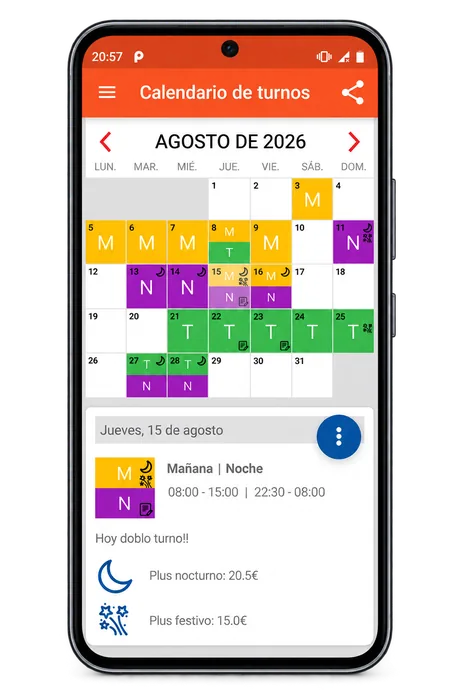
Your work schedule, made simple
An easy, visual way to plan and manage your shifts, whether you work fixed or rotating schedules.
Visual calendar
View your daily shifts at a glance with customizable colors and markers.
Custom work shifts
Create shifts with your own names, times, and colors, including double shifts and night shifts.
Notes and extra pay
Add notes, track public holidays worked, and record night shift or holiday pay supplements.
Statistics
Explore summaries and charts showing your shifts and total hours worked.
Shift patterns
Create shift sequences and plan your work schedule across multiple dates more quickly.
Works offline
Access your work calendar even when you don’t have an internet connection.
Everything you need to know about Work Shift Calendar
Find answers to the most common questions about the app.
Can I create my own work shifts?
Yes. You can create custom shifts with your own names, working hours, and colors to easily identify them on your calendar.
Can I organize rotating work shifts?
Yes. You can create shift sequences and plan your work schedule across different periods of time.
Can I track night shifts, public holidays, and double shifts?
Yes. The app lets you manage double shifts, night shifts, public holidays worked, and any associated pay supplements.
Can I view statistics about my work shifts?
Yes. The app provides statistics and charts to help you track your work shifts and total hours worked.
Does the app work without an internet connection?
Yes. You can access your work calendar even when you’re offline.
Keep your work schedule at your fingertips
Discover Work Shift Calendar on Google Play.